Porter Bud
Construction plant hire, built around the spec sheet
- Industry
- Construction plant hire
- Year
- 2026
- What we did
- Site design and development, content migration
- Live
- not public right now
- Site languages
- UK

- Units in the fleet
- 17
- Catalog sections
- 8
- Service pages
- 12
Overview
Porter Bud, based in Kalush, hires out construction plant with an operator: Liebherr tower cranes, 15–30 tonne excavators, a dozer, rollers, a grader and hydraulic breakers. We built a Next.js site that reads the fleet, services and texts from a CMS, so the owner edits everything in one admin.
- Operating weight
- Power
- Bucket volume
- Undercarriage
- Filters
- Sorting
- Spec table
- Machine pages15
- Service pages12
- Catalog sections8
Home-page figures are counted from the fleet, not typed in.
01 — Challenge
Plant is chosen by numbers — operating weight, bucket volume, digging depth, the carrier class a breaker needs — and those numbers end up in a contract. Rates were known for only part of the fleet. And the person looking is usually on a site, on a phone, and wants a price today.
02 — What we built
We made specifications typed data — numbers for weight, power and bucket volume, a fixed list for undercarriage — so the same values drive the filters, the sorting and the table on each machine page. Rates show where the owner has set them and read “price on request” where he has not. The interface is dark with one orange accent, and every enquiry lands in the admin as a lead with a validated phone number.
03 — Result
A 40-page site — 15 machine pages, 8 catalog sections, 12 services — that the owner runs from the admin: fleet, rates, services, contacts, SEO and analytics. The figures on the home page are counted from the catalog, so adding a machine updates them without a developer.
Catalog and filters
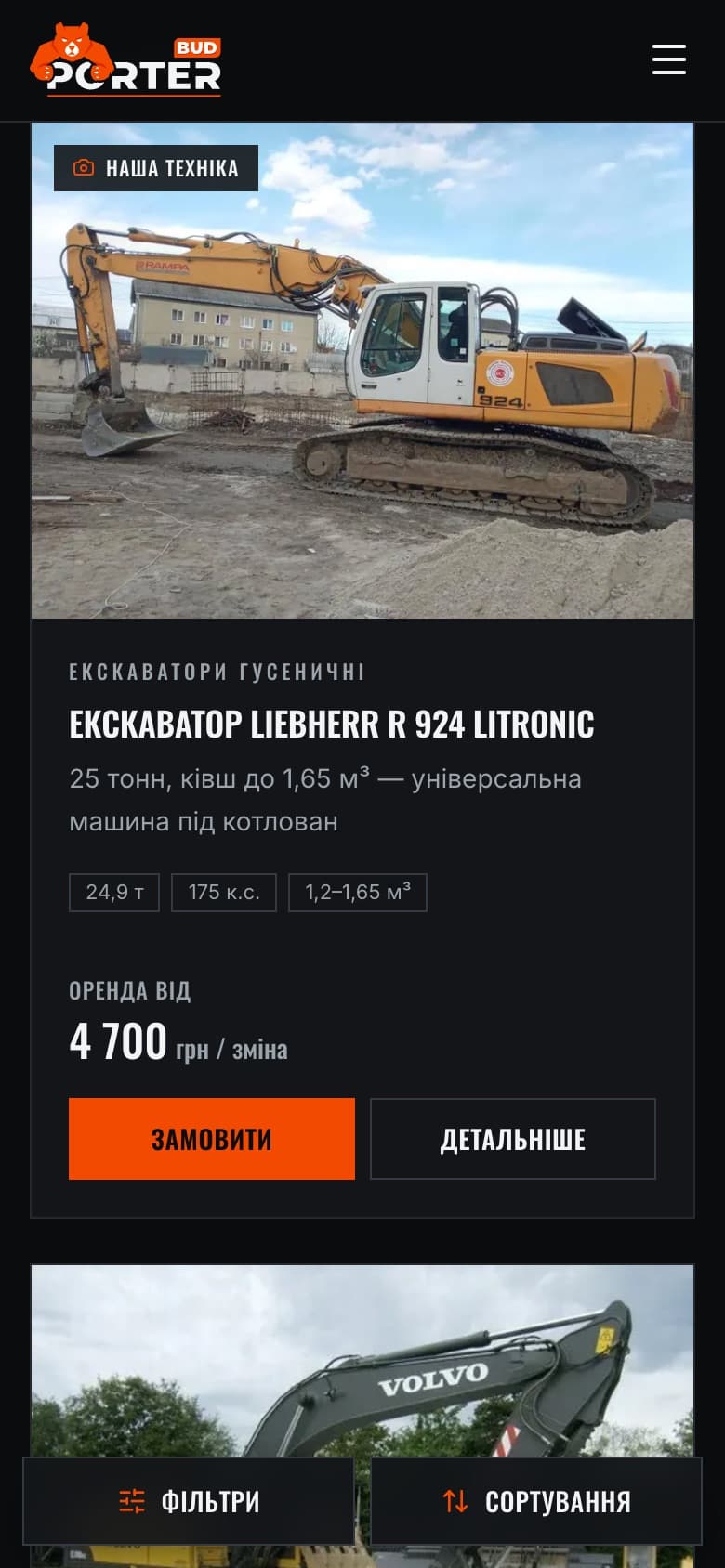
Filters use the same specifications as the machine table: manufacturer, weight in four named bands and undercarriage. Each option shows a count, and the chosen filters live in the URL, so a filtered list can be shared.
- Weight in four named bands instead of a slider
- Sort heavier first, lighter first or by name
- On a phone, filters and sorting dock to the bottom of the screen
Machine page
Plant is hired on its condition and its numbers. Photos of the actual machine open full screen with arrows, swipe and keyboard; the spec table says plainly that values are the model’s data-sheet figures; the rate and the enquiry form sit side by side.
- 4,700 UAH per 8-hour shift, transport priced separately
- “Price on request” wherever the owner has set no rate
- Similar machines from the same section below
Services
Customers search for the job, not the model — “dig a foundation pit”, “break up a slab”. Twelve service pages lead from the work to the machines that do it, laid out as a grid with one shared tone over very different site photos.
- Every service links to the machines that do the job
- Service texts and photos come from the admin
- Twelve jobs, from foundation pits to ponds and drainage
Fleet at a glance
The home page states the fleet in numbers — 17 units, 5 Liebherr tower cranes, 8 catalog sections — counted from the catalog when the page renders. A strip of the manufacturers in the fleet runs above, and eight category tiles lead into the catalog below.
- Figures counted from the fleet, none typed by hand
- Manufacturer strip built from the brands in the admin
- Category tiles and photos straight from the CMS
Key decisions
- Specifications are typed data — numbers for weight, power and bucket volume, an enum for undercarriage — so one set of values drives filters, sorting and the spec table.
- Home-page figures (units, Liebherr cranes, catalog sections) are computed from the fleet at render time rather than typed in.
- If the API is unreachable, pages fall back to bundled catalog data instead of returning an error.
- The admin purges the site’s cache by tag when content changes; otherwise pages are cached for ten minutes.